instaNDT Architecture in Azure
Quick Architecture Overview
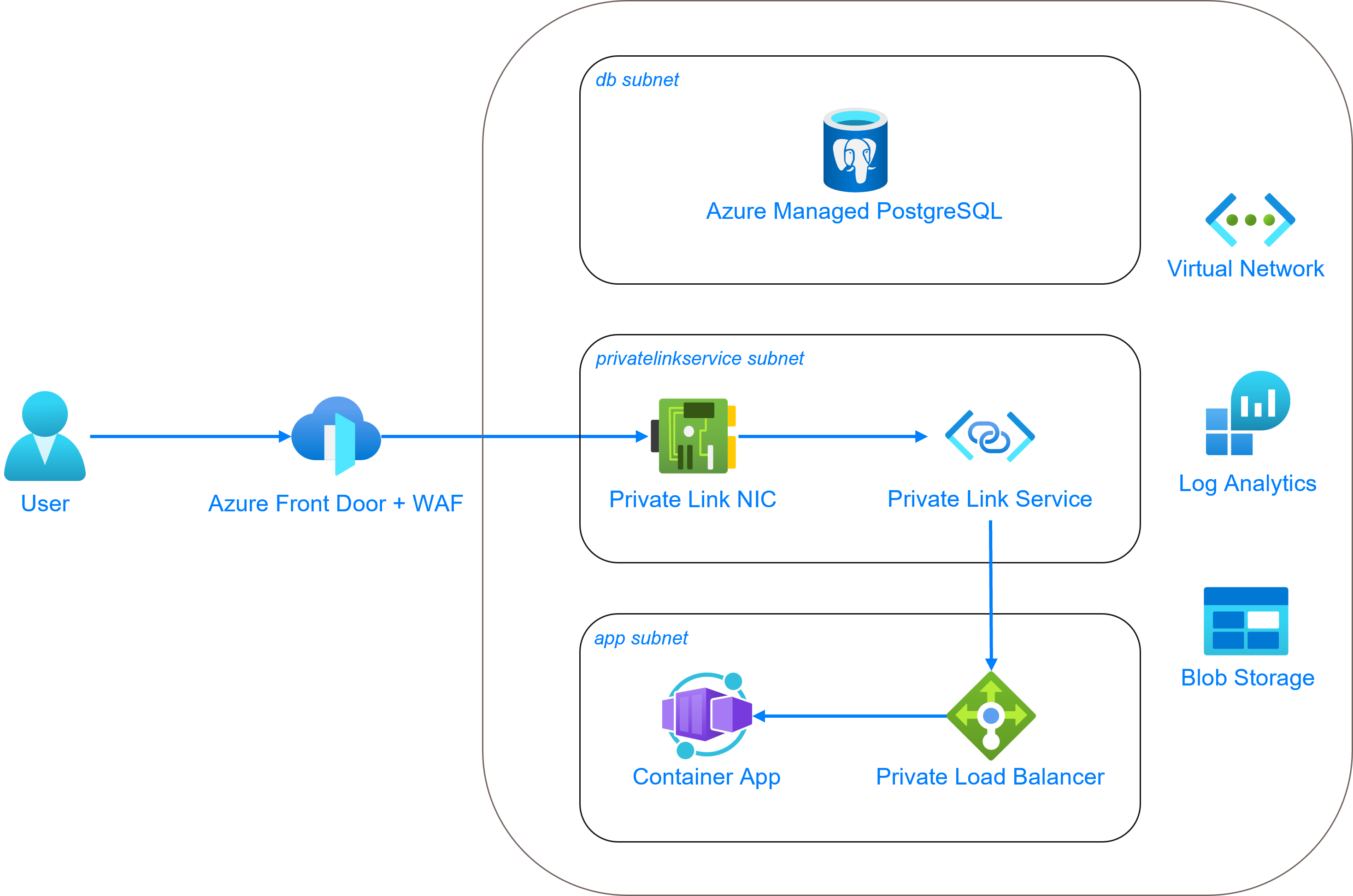
Detailed Overview
Container App
instaNDT will be running inside the Azure Container Environment inside a private subnet. There are 2 container apps deployed namely frontend and backend. And there is a container app job that is deployed for database migration. Every time there is a database migration task, we need to trigger the job and once completed, it’ll quit the container successfully.
Customers will also be given an access token (that should be stored in their respective key vault). This access token is used to authenticate the specific Gitlab repo that contains the docker images to pull. This access token needs to be referenced when creating the container app, so that it could pull the docker image from GitLab without any authentication issues.
CDN / FrontDoor
Each of the container app has ingress exposed internal which means that it would not be directly exposed to public network (a.k.a Internet). We will be using the Azure FrontDoor to both expose the frontend (and backend) and to be used as a firewall (WAF) to protect against unauthorized access to the resources in Azure. But to be able to link the FrontDoor and the container app’s load balancer, we need to have a private link (service) enabled and running in its own subnet.
DNS Zone
Once CDN is configured, it’s recommended to configure DNS zone and the necessary records to point to the CDN URL for ease of use.
Database
Azure (managed) database for postgreSQL instance tiers:
- Burstable (1-20 vCores) - Best for workloads that don’t need the full CPU continuously
- General Purpose (2-96 vCores) - Balanced configuration for most common workloads
- Memory Optimized (2-96 vCores) - Best for workloads that require a high memory to CPU ratio
We are currently using General Purpose instances for database for more highly available (and redundant) instance, especially in production. We can avoid memory optimized instances as we don’t have a heavy workload for database. And to run a smaller instance in non-production environment, Burstable instance is more suitable.
As always, the database needs to be in its own subnet and needs to be accessed through the private FQDN.
Blob Storage
A storage account is created, and a container (equivalent of bucket in AWS) is where the uploaded DICOM images will be stored. This blob storage is private as well to prevent public access by unauthenticated user.
For the container app to access (including download, upload, etc.) the items in the blob storage, we have created a user-assigned identity (UAI) that will be attached to the container app to assume when accessing container (bucket) in the blob storage.
Key Vault
Key vault is needed to store the GitLab access token as mentioned before. Any other credentials, secret or certificates will also be stored here. If necessary, secret rotations can be enabled in the future for let’s say database connection as key vault provides the option to rotate them with very few steps.
Entra ID
Microsoft Entra ID (previously Microsoft AD) is cloud-based identity and access management (IAM) and offers authentication and authorization services to various Microsoft services through SSO.
We should enable Entra ID to be used as one of the sign-in option for instaNDT. It could be managed in the same resource group or if there is already a centrally managed Entra ID, we could use that too. After setting up Entra ID for instaNDT, it will generate a tenant ID and client ID strings that we need to inject into the environment variables of container app.